
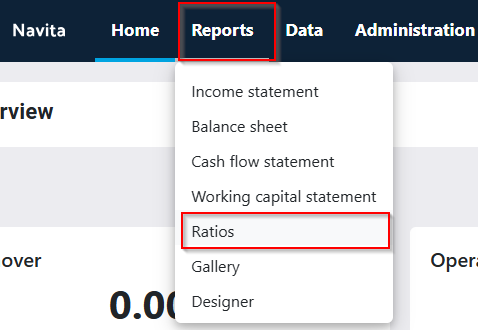
In addition to standard reports, Navita also includes a set of standard key ratios that come pre-installed in the application. The standard key ratios are intended to provide an overview of the company’s financial situation and its development. The standard ratios can be viewed under the Report menu, in the Ratios section.
The list of standard key ratios is divided into four groups: scope of operations, result and profitability, financing, and other key figures.
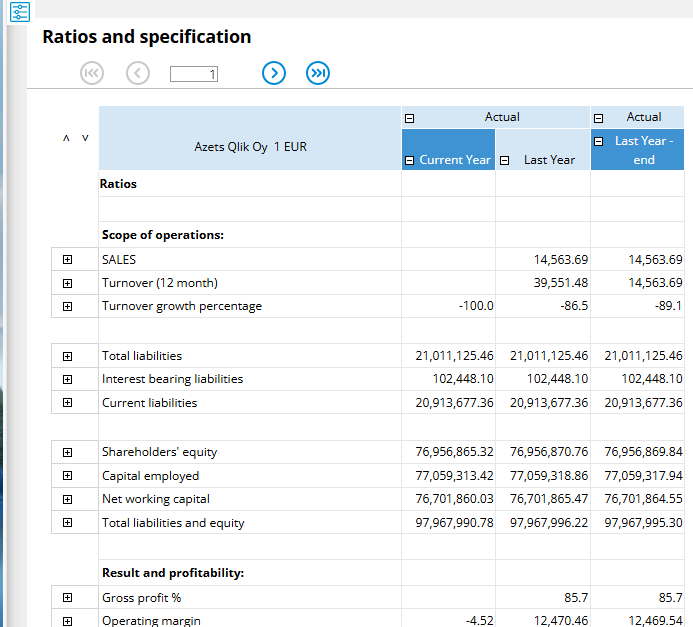
On the report rows, you can drill down to the lowest levels by clicking the small plus signs at the beginning of each row. By clicking a cell that contains a value, you can open the cell’s input form, where you can review how the value has been generated at the cost center level.
From the menu that opens via the filter icon on the left side, you can modify what is displayed in the report.
- The available options are Key Figures, SIPO and ROI Breakdown, and a combined report (as shown in the image).
- In the lower drop-down menu, you can choose whether to view the report as a comparison to the previous year or to display the values on a monthly basis.
- Using the Update function, any changes made to the report will be applied to the view.
- The Save Report Link function saves the current report by default to the ‘Report Links’ folder, allowing the same report to be retrieved later from the Gallery section under the Report Links tab in the Reports menu.”